Top 5 Free SEO Tools for Beginners (No Credit Card Needed)
Free SEO Tools for Beginners (No Credit Card Needed)

In this guide, we’ll walk you through the top tools that make SEO more accessible for everyone, even if you're not a tech pro.
Why SEO Tools Matter for Beginners
Understanding SEO Basics
SEO stands for Search Engine Optimization—the art and science of helping your content show up higher in Google searches. SEO tools help you:
-
Find what people are searching for (keywords)
-
Check how well your site is doing
-
Learn what your competitors are up to
-
Fix common errors on your site
The Challenge for Students and Non-Tech Users
Many beginners think SEO is too complex or expensive to get started with. But the truth is, with the right tools and a little guidance, anyone can start learning SEO, even on a tight budget. That's why we focused on free seo tools for beginners that are intuitive, educational, and perfect for dipping your toes into the SEO world.
What Makes a Good Free SEO Tool?
No Hidden Fees or Credit Cards
A real free tool means you can sign up, try it out, and start learning without needing to pull out your credit card. All the tools listed here are 100% free or have generous free tiers.
Ease of Use for Non-Experts
A great beginner tool doesn't bombard you with data you can’t interpret. It guides you clearly and visually—ideal for students or small bloggers trying to improve their site without a steep learning curve.
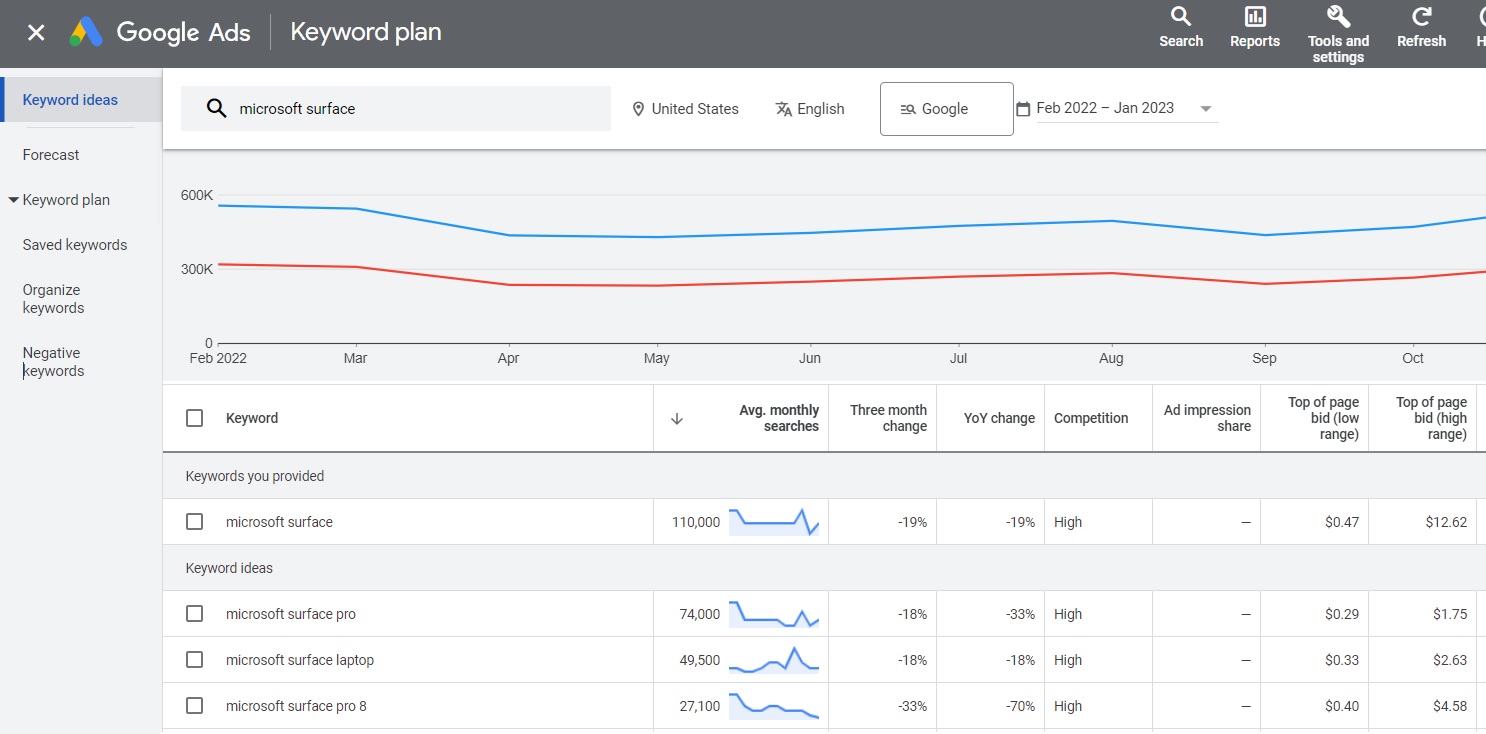
1. Google Keyword Planner – Free, Reliable, and Beginner-Friendly
How to Access It
You’ll need a free Google Ads account (no ad spend required). Once you sign up, go to Tools & Settings > Keyword Planner.
Simple Use Cases for Students
-
Type in a topic (e.g., "sustainable fashion") to see search volume
-
Discover related keywords to write about
-
Get data straight from Google—the world’s top search engine
It’s perfect for planning blog posts, YouTube content, or even academic projects with a digital angle.
2. Ubersuggest – Neil Patel’s Power Tool for Free
Key Features in the Free Plan
Ubersuggest by Neil Patel gives you:
-
Keyword volume, SEO difficulty, and CPC
-
Competitor analysis
-
Site audit for beginners

Keyword and Competitor Analysis for Beginners
Enter any website or keyword, and Ubersuggest will break it down simply. For example, search “vegan skincare” and instantly get content ideas, keyword difficulty, and sites already ranking.
It’s one of the most beginner-friendly platforms, especially for SEO tools for students or personal bloggers.
3. AnswerThePublic – Free Visual Keyword Research
Discovering Questions and Topics
This tool creates a visual map of what people are asking online. Just enter a topic and get:
-
Questions (Why, How, When, etc.)
-
Prepositions (“for,” “without,” “vs”)
-
Comparisons (“best vs worst”)
Ideal for Blog Ideas and Assignments
Perfect for brainstorming essay titles, YouTube scripts, or niche blog content. AnswerThePublic helps students connect directly with real audience questions.
4. SEOquake – On-Page Checker for Chrome
Install and Use in Seconds
It’s a browser extension for Chrome/Firefox. Once installed, visit any webpage and get instant SEO data like:
-
Meta description
-
Keyword density
-
Backlink info

What It Shows and Why It Helps Beginners
Great for reverse-engineering top-ranking articles. It’s also a good way to learn by example—seeing how others structure their content for SEO.
5. Google Search Console – Track Real-Time SEO Health
Verify Your Site and See Results
Once your site is connected, you can:
-
Track search traffic
-
Monitor site errors
-
Submit sitemaps
Basic Metrics You Should Monitor
For beginners, just keep an eye on:
-
Total clicks
-
Search impressions
-
Top-performing queries
All this comes straight from Google, making it one of the most trustworthy free seo tools for beginners.
Bonus Picks: Other Useful Free SEO Tools
MozBar
A Chrome extension from Moz that shows domain authority, backlinks, and more—right in your browser.
Screaming Frog (Free Version)
Perfect for a quick site audit of up to 500 URLs. It checks technical issues like broken links and missing tags.
Check out our guide on 7 Types of Digital Marketing Explained with Examples for bloggers.
Comparison Table: Best Free SEO Tools for Beginners
| Tool | Best For | Standout Feature | Credit Card Needed? |
|---|---|---|---|
| Google Keyword Planner | Keyword Research | Google-sourced data | ❌ |
| Ubersuggest | Competitive Analysis | Easy-to-understand metrics | ❌ |
| AnswerThePublic | Content Ideas | Visual keyword maps | ❌ |
| SEOquake | On-Page SEO | Instant page analysis | ❌ |
| Google Search Console | Site Performance | Real-time insights | ❌ |
Tips for Getting the Most from These Tools
Focus on One Goal at a Time
Don’t try to master all tools at once. Pick one tool, explore it, and apply what you learn to a specific project—like a blog post or student report.
Use Tools Together for Best Results
Combine tools. Use Google Keyword Planner for ideas, SEOquake for structure, and Ubersuggest for competitors. This layered approach helps even beginners produce high-quality SEO content.
✅ FAQs About Free SEO Tools for Beginners
Q1: Are free SEO tools enough for beginners?
Yes! Many free tools offer more than enough features for learning and getting solid results.
Q2: Do I need to install anything?
Some tools like SEOquake are browser extensions, while others are fully online.
Q3: Can I use these tools on mobile?
Yes, most are mobile-friendly, though desktop use gives better data views.
Q4: Are these tools safe to use?
Yes, they’re widely trusted by marketers, students, and bloggers alike.
Q5: What’s the best SEO tool for a student blog?
Start with Ubersuggest and Google Keyword Planner—they’re perfect for research and planning.
Q6: Is Google Keyword Planner really free?
Absolutely. You just need a free Google Ads account to access it.
Conclusion: Start Strong with the Right Free Tools
You don’t need a big budget or fancy credentials to dive into SEO. With these free SEO tools for beginners, you can learn the ropes, improve your website, and even grow your blog traffic—all without spending a dime. So why wait? Pick one and get started today!


We were spending money on social ads without results until we consulted Digital Marketing in Faridabad. Designyze redesigned our campaigns with precise audience targeting and compelling creative strategies. Our click-through rate improved, and we got far better inquiries. Their ability to translate creativity into lead flow is impressive.
ReplyDelete